2D code scanning
The Data Matrix codes and barcodes on explosives are read with the mobile terminal, even in poor light. Damaged labels can be entered manually, using the keypad.
Compliant with Directive 2008/43/EC (as amended by Directive 2012/4/EU)
Scan the unique codes on explosives with your phone (Android or iPhone), with a tablet and a Bluetooth 2D scanner, or with a mobile terminal, and every goods-in and goods-out movement ends up in one place: stock, movement history and the explosives register, available at any time, from any device.
Launch offer: −20% in the first year with annual billing, free activation and training 54days11hours05min See pricing
The phone and tablet app, on Google Play and the App Store Available
Explosives Traceability
Built for the safe and secure movement of explosives, in line with European legislation: at any moment you know who holds an explosive, where it is and what has happened to it.
The Data Matrix codes and barcodes on explosives are read with the mobile terminal, even in poor light. Damaged labels can be entered manually, using the keypad.
For every unique code you can see the date it entered the warehouse, the date it left, the person who took the material out, the person who used it and the place of use.
The scanning app runs on Android and iOS: on your own phone, on a tablet with a Bluetooth 2D scanner, or on the rugged, shock-resistant terminals we supply. Each terminal works on one warehouse, and several terminals can work on the same warehouse.
The solution is hosted on our servers. We take care of hosting, support and maintenance; all you need is a terminal and an internet connection.
Access with a username and password, daily backup and at least 10 years of history. If you wish, you receive a copy of your data at regular intervals (monthly, quarterly or yearly), so that you can keep it too.
No more writing down codes, locations or names on paper. You scan, and any code can be found instantly in the portal, with a single click.
How it works
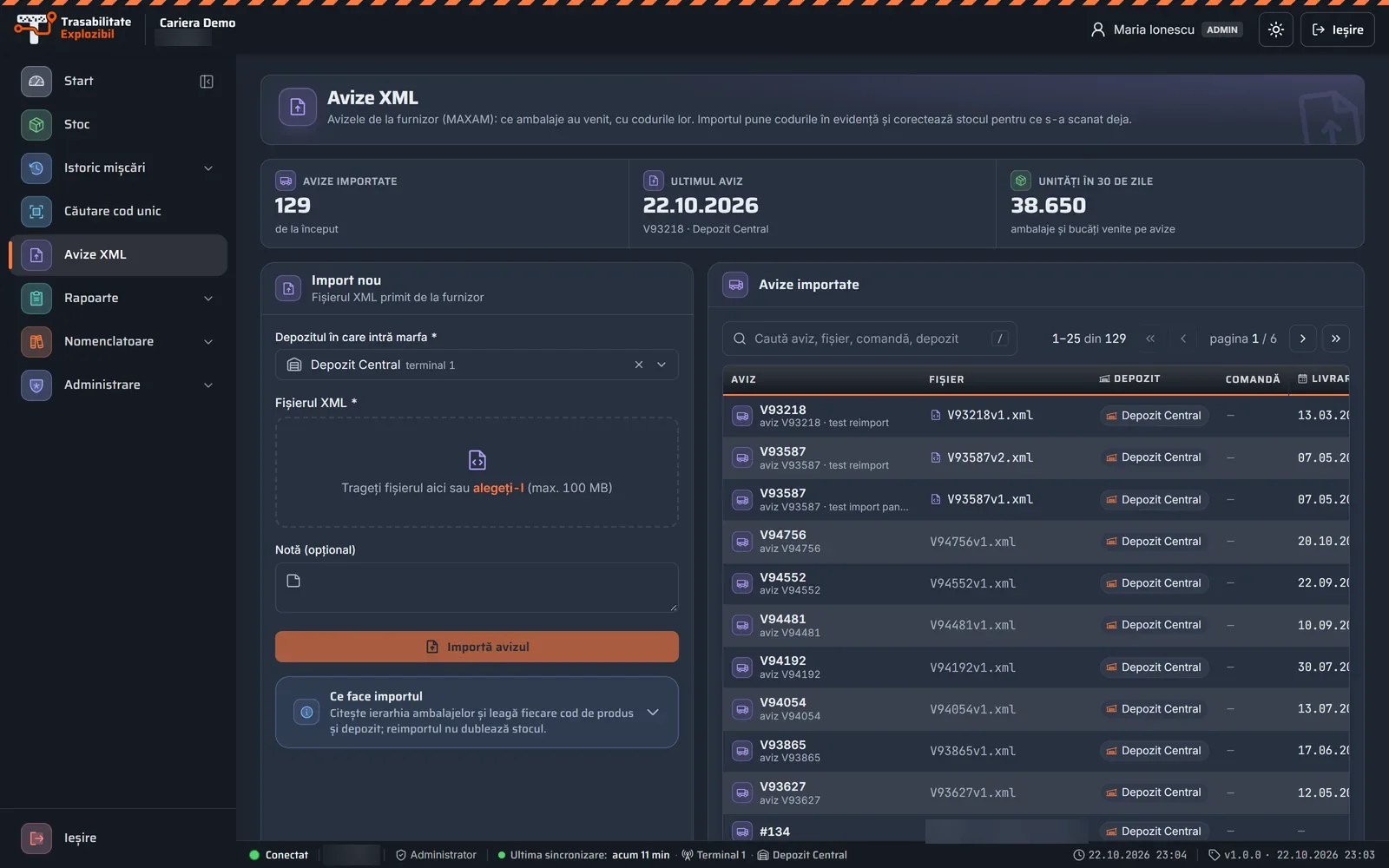
The XML file that comes with the explosives is imported into the portal: the unique codes and products are known before the goods are received.
On goods in and goods out, the shotfirer scans the codes with the Explosives Traceability app and selects the person and the location.
The terminal sends the scans to the portal over the mobile network or Wi-Fi and receives the master data in return: products, people, locations.
In the portal you can see the stock, the history by day, month and year, the shotfirers, the locations, and the date and time of every scan.
Explosives Traceability how it works
From scanning in the field to the explosives register, in real time
How Explosives Traceability works: the mobile terminal scans Data Matrix codes, QR codes and barcodes and sends the scanned codes over 4G or Wi-Fi to the web portal (with no signal, the scans stay on the terminal until confirmed), which receives the movements in real time and sends back the master data, the XML delivery notes, the products, the shotfirers and the locations. The portal keeps the stock by warehouse, the explosives register in line with Directive 2008/43/EC and 10 years of history, with daily backup.
4GWi-Fino signal
scans stay on the terminal until confirmed
The platform, from the inside
Screenshots from the Explosives Traceability portal, with demo data. Stock, history, codes, delivery notes and the register, on a computer, tablet or phone — with secure access, for your company's people only.
Swipe sideways · click to enlarge
Screenshot 1 / 12
Operators' obligations
Directive 2008/43/EC (as amended by Directive 2012/4/EU), together with the national legislation transposing it, establishes the system for the unique identification and traceability of explosives. The software covers each of the obligations below.
Read about the legal backgroundA data collection system for explosives, including their unique identification throughout the supply chain and the life cycle.
Location and custody: recording where each explosive is while it is in the operator's possession or custody, until it is used.
Testing the system at regular intervals, to ensure its effectiveness and the quality of the data recorded.
Informing the authorities, on request, of the origin and location of any explosive — 24 hours a day, 365 days a year, for 10 years.
Unique code lookup
An inspector arrives and asks: where is the cartridge with code RO999…? You have the answer in 3 seconds: which package it belongs to, which delivery note it arrived with, who took it out and where it was used.
Illustration with made-up data. A simple code lookup (where it is now and its last movement) is always available, on every plan; the code report for inspections (PDF) and list lookup are included from Quartz and from Granite upwards, respectively. See the plans
This is what a lookup looks like in the portal, on a computer, phone and tablet
Swipe sideways · click to enlarge
Screenshot 1 / 3
Pallet, box or item: see what it contains and what it is contained in.
Every goods-in and goods-out movement of the code, with the person, the place and the time.
With the printed code report, without searching through notebooks.
It also works for codes scanned before you import the delivery note.
Your data, from anywhere
The shotfirer scans on a terminal, phone or tablet, in the warehouse or at the working face. You see the stock, history and register on a computer, tablet or phone, at any time — with secure access over HTTPS, using only the company ID, a username and a password.
Data security
What the portal does to keep your data safe — specifically, with no vague promises.
Your company's data is kept separately, in its own database, not mixed with anyone else's.
You sign in only with the company ID, a username and a password; the portal runs over HTTPS.
Passwords are stored encrypted (bcrypt). Resetting is only possible via an email link, valid for 60 minutes and usable once.
Administrator or View only — permissions are checked on the server, on every request.
It is shown only after you re-confirm your password, and every time it is shown is recorded in the log.
As required by Directive 2008/43/EC. Nothing is ever deleted from the register.
Daily data backup, with monthly copies kept for 10 years.
The terminal keeps the scans on the device until it receives the server's confirmation.
Each sync is written in a single transaction: no half-saved data.
New in the portal
Daily, weekly or monthly — each user switches them on in their profile: scans, consumption by product, shotfirers, places of use, stock by warehouse, delivery notes, unsynced terminals and alerts.
The software automatically flags duplicate goods out or goods in, goods out from the wrong warehouse, negative stock and re-imports that doubled the stock. It changes nothing: it simply shows you what needs checking.
Several terminals or phones can work on one warehouse at the same time, each with its own scans.
See at any time how many of your plan's scans you have used this month.
The mobile app · Android, iPhone and iPad
On phones (Android and iPhone), on tablets (Android and iPad), including with a Bluetooth 2D scanner, and on the rugged terminal. You scan in the warehouse or at the working face, and the stock and the register in the portal update themselves.
On a phone or tablet, Android or iPhone / iPad: Data Matrix codes, with torch and zoom, and no duplicate scans.
On rugged terminals (Zebra, Honeywell, Datalogic and others), the built-in scanner is detected automatically. On a tablet, you connect a 2D scanner via Bluetooth.
Even in airplane mode. Scans stay on the phone until you send them from Transactions.
Every scan stays on the device until the server confirms it has received it.
Green, yellow or red for every code, with a sound and a vibration — mistakes show up immediately.
See the warehouse stock and where a code is. On a tablet, the scans and the totals sit side by side.
Use the phone and the app in accordance with the safety instructions. Near electric detonators, the app shows you when the radio is on and takes you to airplane mode.
Equipment
Scan with an Android phone or iPhone (camera), with a tablet and a Bluetooth 2D scanner, or with the rugged terminal with a 2D scanner — everyone uses what suits them. For high volumes we recommend the terminal: it is faster, reads even worn codes and has a large battery; we supply it ready configured. The Windows Mobile terminals you use today keep working.

The terminal the app has run on from the start. It remains functional and supported: you keep using it, with the same portal and the same history.

On your own phone or on rugged Android terminals: a large, easy-to-read screen, a professional 2D scanner for Data Matrix and QR codes, 4G or Wi-Fi connectivity. We supply the terminals configured and ready to work.

Implementation
We treat every order with the utmost care. We visit your premises, install the software on the terminals and train your staff. Activation and initial setup are free and are done straight after you order.
They trust us